
Get ready to fly
Read this before you travel. It covers the documents to bring, how to set up your radio so you help the frequency instead of blocking it, how live tracking works, and the airspace you load before every task. Arrive with this done and you spend the week flying, not fixing.
Your 2026 events
01 Bring these
You register in person at headquarters, and registration is checked against the documents you carry. Miss one and you do not fly. Bring the originals.
Present at registration
- Valid FAI Sporting Licence
- IPPI card, level 4 or above
- Proof of third-party liability insurance, in English
- Proof of medical and travel insurance covering hospital, rescue and repatriation, in English
Fly with
- A certified glider (CCC, EN or LTF)
- Harness with certified back protection
- Helmet certified for paragliding
- Reserve parachute, recently repacked
- VHF radio, set up as below
- Mobile phone, plus a power bank of at least 10,000 mAh
02 Set up your radio
The safety frequency is shared by everyone in the air. One stuck transmit button, or one beeping vario keying an open mic, and nobody can call a safety message. Five minutes of setup at home keeps the frequency clear for the whole field, you included. A radio check runs at take-off before every task, and a radio that is not working or not reachable means you sit out that task.
Time-Out Timer (TOT)
Set your Time-Out Timer to 30 seconds maximum. 15 is better. The timer cuts your transmission if the button is held down or pressed by accident, so a jammed PTT can no longer hold the frequency open. We check the setting at registration.
External PTT: switch the internal button off
Plugging an external or headset PTT into your radio does not switch the radio's own button off. Both stay live. A radio's own PTT pressed against your body, or trapped in a pocket, is the classic cause of a blocked frequency. When you fly with a headset or external PTT, disable the radio's internal PTT so only your external button transmits.
Turn off the roger beep and squelch tail
The roger beep and the squelch-tail tone send a short tone over the air every time you finish a transmission. Across a full field they clutter the frequency for no reason. Turn them off so your transmissions end clean.
No VOX
Voice-activated transmit is forbidden on every frequency. A beeping vario or cockpit audio will key a VOX mic and hold the frequency open, including the safety frequency. Turn VOX off. Press to talk, always.
Where the radio goes
Carry your radio on the shoulder strap or on the cockpit, with the PTT facing away from your body. Not on the waist strap, not in a harness side pocket, not in a jacket pocket. A dedicated harness radio pocket, for example the Advance Impress 4, counts as approved.
On the air
Monitor the safety frequency the whole task and be ready to transmit on it. Keep chat off it: it is for safety only. The words Cancelled and Stopped belong to the Safety Director and Meet Director alone. If you want to know whether a task is still running, ask for Task status. You may run a legal team frequency as well, but only on dual watch or a second radio, so the safety frequency is never left unmonitored.
149.52500 MHz Retrieve 149.38750 MHzYour family and friends can listen to the Safety frequency while tasks are running: the Black Box, built by Flying Karlis Events, relays it live to the public Chabre Club - LIVE Telegram channel.
03 Live tracking
Two trackers, both mandatory, and it is your job to keep them running.
Our tracker: Flymaster LIVE ONE
We hand you a Flymaster LIVE ONE with FLARM at take-off before every task. Collect it, switch it on, and mount it on your shoulder strap or cockpit with the safety line clipped to your harness. On the cockpit keep it to the side, away from other electronics, and never sandwiched between another tracker and your phone. Return it to headquarters as soon as you land, before anything else. You are responsible for it, up to 300 euro, until it is back in our hands. No tracker collected means no task flown. The same tracker is also how you tell us you are safe when your phone cannot, so read reporting in before you fly.
Your backup: PureTrack
Backup tracking through PureTrack is mandatory under FFVL rules, on top of our tracker. Before the first task:
- Create a PureTrack account in your full name, first name and surname.
- Add your tracking device or app.
- Join the event group, named for your event, for example "Flymaster XC Challenge 2026".
No other tracking device? Install Sports Track Live (free) and add it to PureTrack. Keep the backup live and running for the whole of every task.
04 Your phone, and reporting in
Your phone is part of your safety kit. On, out of airplane mode, GPS on, charged, for the whole flight, and reachable the moment you land. Carry a power bank of at least 10,000 mAh.
Report in within 5 minutes of landing, every task. You do that through FlymasterRetrieve, and you need to register on it before you travel.
Five minutes is not a paperwork deadline. It is the point at which we start looking for you: a tracker that has been still for five minutes triggers a search procedure, and if that fails we pre-alert the rescue services.
What FlymasterRetrieve is
It is the system we run the retrieve on. Every pilot sits on one map at headquarters with a status next to their competition number: flying, landed, needs a retrieve, picked up. Our staff work that map all day, and it is where your landing report arrives.
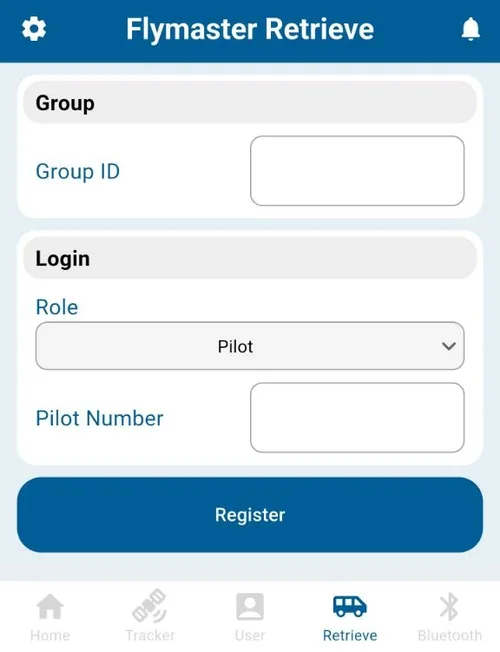
You reach it in one of two ways, and they do exactly the same thing: a Telegram bot, or the Flymaster Link app on its Retrieve tab. Both work, on Android and on iPhone, and both give you the same options once you land. Pick the one you prefer. You do not need both.
It is not a third tracker. Your position comes from the LIVE ONE we hand you, and your backup comes from PureTrack. FlymasterRetrieve is how you and the organisation talk to each other once you are on the ground.
Register before you travel
Once per event, about two minutes. You need two numbers. Your event group ID is
7748 for the Flymaster XC Challenge and 7749 for the Belgian B
Paragliding Open. Your competition number is also your pilot number and your tracker number, and it is on
your registration confirmation. Type it exactly: a wrong digit registers you as somebody else.
Then take either route below. Your choice, and neither is better.
In Telegram
You send short commands.- Install Telegram and open it.
- Open @RetrieveBot, the FlymasterRetrieve bot, and press Start.
- Send
REG:7749:24, replacing 7749 with your event group ID and 24 with your own competition number. - Send
WHOAMIto confirm it worked.
In the Flymaster Link app
You fill in a form and press buttons.- Install Flymaster Link from your app store.
- Open the Retrieve tab along the bottom.
- Group ID: your event group ID.
- Role: Pilot.
- Pilot Number: your competition number.
- Press Register.
@RetrieveBot. Anyone on Telegram
can copy a bot's display name, but the username is unique. If you register with a copy, your landing report goes
nowhere and we still think you are in the air.SAFE does nothing at all, and as far as our map is concerned you are still in the air.
Check it on the ground, not after your first landing.The commands
SAFEI have landed and I am fine. Send this first, every time,
within five minutes.SOSEmergency. It sends your last known position to the
organisation straight away.RETI need a retrieve. Send it only once you are somewhere a car
can actually reach.NORETI do not need a retrieve. Sending it frees a seat for
somebody who does.DNFI did not fly today.ORG:Followed by your message, sends it to the organisation.WHOAMIChecks that you are registered.HELPLists every command. A single ? does
the same.In the Link app the same actions appear as buttons, so you press instead of typing. If the system detects your landing by itself, it messages you first and offers the buttons in one tap.
RET.If your phone is dead or has no signal
Your Flymaster LIVE ONE can send both messages on its own, with no phone and no signal at all. To report a safe landing, go through the tracker's menu, choose the safe landing report, and press enter. The screen shows sending, then sent. For an emergency, hold the red button for 5 seconds and it sends an SOS with your last known position.
If none of that is available, get to a road and reach us any way you can: a borrowed phone, the safety frequency if you are still in range, or somebody driving past. Thirty minutes of silence starts a rescue action.
Your group and channel links are emailed to you when you register, and they live in your CIVL wallet. Open the communication page for your event:
05 Airspace
Airspace is monitored for your entire flight, launch to landing, every task, whether or not a task is running. Getting your instrument set up right is the difference between an early warning and a zero for the day.
- Load the current Chabre Club airspace file into your instrument before every task. Get it from our airspace page.
- Set your instrument to GPS (GNSS) altitude, in metres. Every limit in the file is defined that way.
- Turn the airspace alarms on and confirm they are active.
Every airspace carries a protective buffer, 400 metres where the geometry allows. The buffer is an early warning and a safety margin, not usable airspace. Stop climbing and turn away before you reach it. Enter it and the penalty is simple: 1 metre in costs 1 percent of the day, so 100 metres in is a zero. Fly the course line, thermal, or work the air while inside it and you are disqualified.
06 On the hill
A few rules that keep the day safe for everyone:
- A task is not flown in winds above 30 km/h at take-off. The Meet Director may set a lower limit at briefing.
- Launching is only during the open window. The decision to take off is yours, and yours alone.
- Fly your own task, without outside help. Maneuvers that endanger others are forbidden.
- See an accident or hear a help call? Tell the organisation and the other pilots straight away, with the nature and location. A pilot who lands or shortens a flight to help someone in distress is compensated in points.
07 Common questions
What do I need to bring to a Chabre Club competition?
Your originals for registration: a valid FAI Sporting Licence, an IPPI 4 (or higher) card, and proof of third-party liability and medical or travel insurance in English. You fly with a certified glider (CCC, EN or LTF), a harness with certified back protection, a helmet, a recently repacked reserve, a VHF radio and a phone. Bring a power bank of at least 10,000 mAh.
What radio setup does a Chabre Club competition require?
A VHF radio that can hold the safety frequency, with its Time-Out Timer set to 30 seconds or less (15 is better). If you use a headset or external PTT, disable the radio's own PTT so only the external button transmits. Turn off the roger beep and VOX, and carry the radio on your shoulder strap or cockpit with the PTT facing away from your body.
What live tracking do I need?
Two trackers, both mandatory. The club hands you a Flymaster LIVE ONE at take-off before every task, which you return to headquarters after you land. On top of that you run your own PureTrack backup: create an account in your full name, add your device or app, and join the event group before the first task.
What altitude reference do I set for the competition airspace?
GPS (GNSS) altitude in metres. Every limit in the airspace file is defined that way, and compliance is judged on GPS altitude alone. An instrument set to barometric altitude or to feet is not a defence against a penalty. Load the current airspace file and turn its alarms on before every task.
How soon must I report after landing?
Within five minutes. Send SAFE in the FlymasterRetrieve Telegram bot or the Flymaster Link app, or press it from your tracker's own menu. Silence on the ground triggers a rescue, and no contact for 30 minutes can mean disqualification and the cost of a call-out you did not need.
How do I register on FlymasterRetrieve?
Once per event, before you travel, and you choose how. In Telegram, open the FlymasterRetrieve bot (@RetrieveBot), press Start, and send REG: followed by your event group ID and your competition number. In the Flymaster Link app, open the Retrieve tab, enter the same group ID, set Role to Pilot, enter your competition number, and press Register. Both work on Android and iPhone. Send WHOAMI afterwards to confirm you are on the list.
The night before task one
- Documents packed, originals
- Radio: TOT set, internal PTT off, roger beep off, VOX off, carried on the shoulder or cockpit
- PureTrack account created, device added, event group joined
- FlymasterRetrieve registered, and
WHOAMIconfirmed it - Phone charged, power bank packed
- Airspace file loaded, instrument on GPS altitude in metres, alarms on